
Project Overview
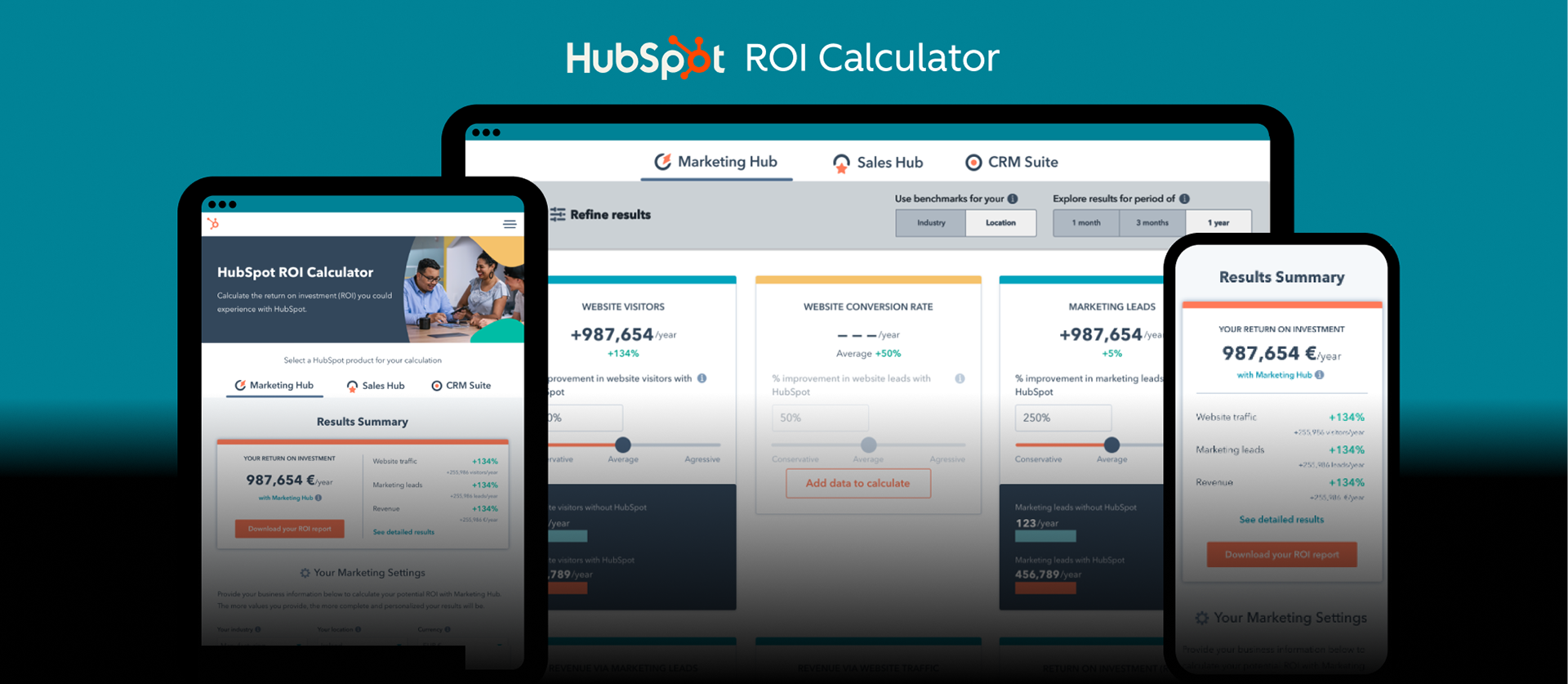
The Objective: Redesign HubSpot’s ROI Calculator to transform a basic utility into a persuasive, data-driven storytelling tool that quantifies the business value of the platform to support growth goals.
The Challenge: Simplifying complex financial modeling and multi-variable inputs into a frictionless experience that yields credible, easy-to-digest ROI projections.
My Role: Lead Product Designer; responsible for the end-to-end UX, interactive data-visualization strategy, and logic-based input systems.
The Process: Implemented a progressive disclosure framework and real-time visual feedback loops, allowing users to see the immediate impact of their data without overwhelming them with complexity.
The Impact: Established a high-authority sales enablement asset that builds immediate user trust, helping prospects visualize long-term growth and justifying investment through clear, professional-grade reports.
The Deep Dive
ROI Calculator: Turning Data into Decisions
I led the experience strategy for a unified ROI engine that transformed a high-friction form into a "Zero-Input" value demonstrator, driving leads and sales adoption across global markets
Role: Lead UX Designer
Company: Hubspot (2021-2022)
Scope: Product Design, UX/UI, Design Strategy, Mobile & Responsive, Growth & Acquisition, Data Visualization, Localization, Sales Enablement
Partners: Engineering, Product Marketing, Sales, Web Strategy, Data Analytics, QA
Duration: 6 months
Company: Hubspot (2021-2022)
Scope: Product Design, UX/UI, Design Strategy, Mobile & Responsive, Growth & Acquisition, Data Visualization, Localization, Sales Enablement
Partners: Engineering, Product Marketing, Sales, Web Strategy, Data Analytics, QA
Duration: 6 months

Context
The HubSpot ROI Calculator is a data-driven persuasion engine designed to quantify the potential value of HubSpot’s platform.
The Challenge: The Blank Page Paralysis
"Customers don't always know the inputs required."
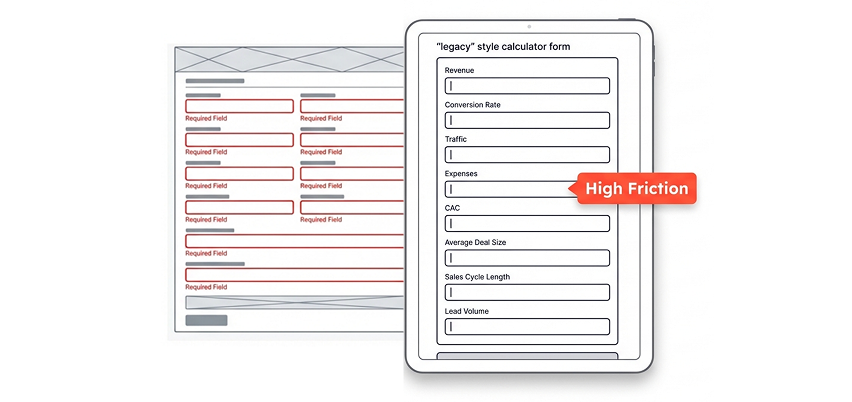
Legacy calculators failed by gating value behind a high-friction ‘cold start’, requiring 8+ distinct data inputs that users rarely had readily available before even showing any value.
Business Impact
This barrier created significant cognitive friction, leading to high abandonment rates. Sales Reps avoided the legacy tool because it forced "homework" on the prospect before the demo.
Framing The Business Need
Transform the ROI calculator from a "data entry task" into a "persuasion engine" that drives high-quality leads and sign-ups.
The modernized solution would be defined successful if it's:
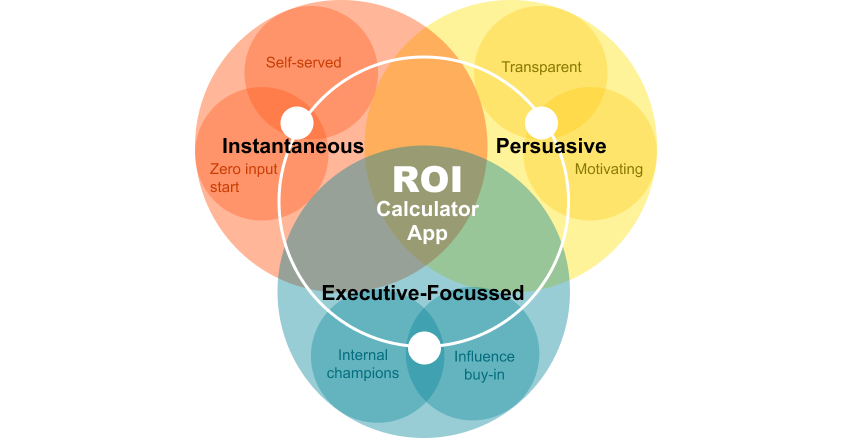
1. Instantaneous: Capable of delivering a credible ROI estimate without a single keystroke from the user ("Zero-Input"). Self-service clarity on investment costs without sales pressure.
2. Persuasive: Structured to create transparency and trust, motivating high-quality leads and sign-ups rather than just delivering a number.
3. Executive-Ready: The output needed to survive the browser session, arming internal champions (our 3rd persona) with a "boss-ready" artifact to influence buying committees.
Constraints
➜ Dual-Persona Complexity: The solution had to serve two distinct users simultaneously: the Website Visitor (self-serve exploration) and the Sales Rep (consultative demo tool).
➜ Global Scalability: The design needed to support 6 languages and local currencies immediately, while sharing a single React codebase across various product lines (Marketing, Sales, CRM) to minimize technical debt.
➜ Authentication Constraints: Unlike internal tools, this had to be purely public-facing with no user authentication, limiting our ability to pull existing customer data.
Role & Ownership
• I led the end-to-end design effort, cross-collaborating with Product Marketing, PM, Engineering, and Web Strategy.
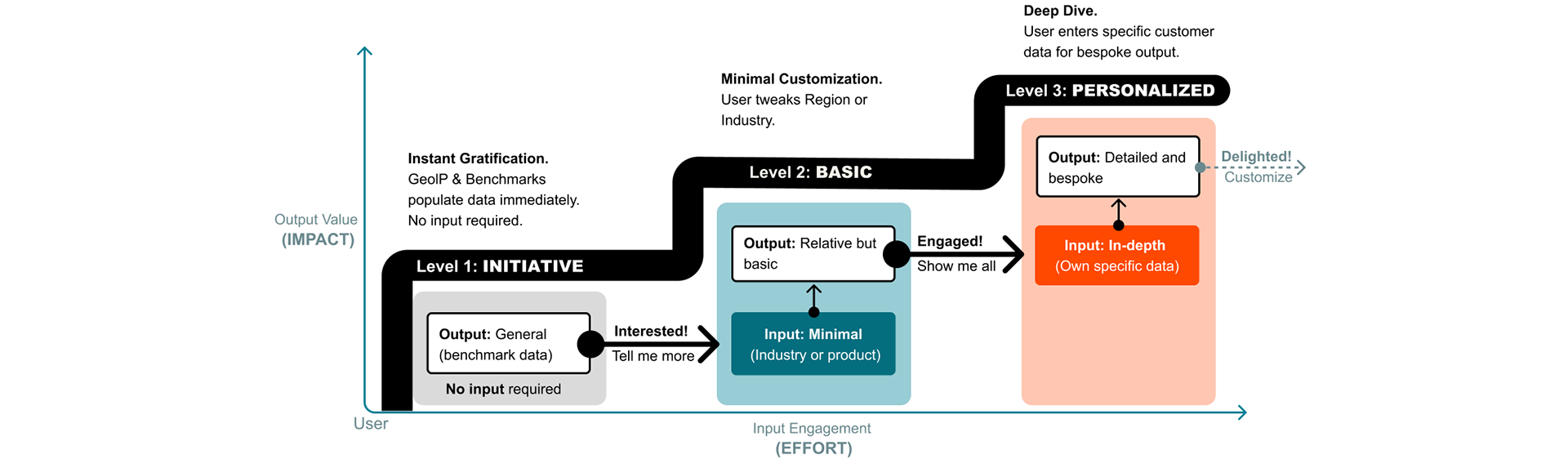
• Partnered with Data & Tools team to translate 240K+ data points into a simplified "Initiative" vs. "Detailed" engagement model.
• Influenced the engineering approach by advocating for a unified template strategy, which allowed the "CRM Suite" and "Sales Hub" calculators to live within the same architecture.
• Did not own the backend calculation formulas or the initial aggregation of the benchmark data.
Strategy & Approach
Key Decision 1
"Zero-Input" Strategy via GeoIP
➜ The Option: Wait for users to input region/industry (standard flow) vs. Automate it.
➜ The Decision: I implemented a "Level 1" engagement state that uses GeoIP to detect the user's region and pre-select the appropriate currency and benchmarks.
➜ Why: This removed the "cold start" problem. A user landing on the page immediately sees relevant ROI projections, shifting the interaction from "Work" (filling forms) to "Play" (adjusting sliders).
Key Decision 2
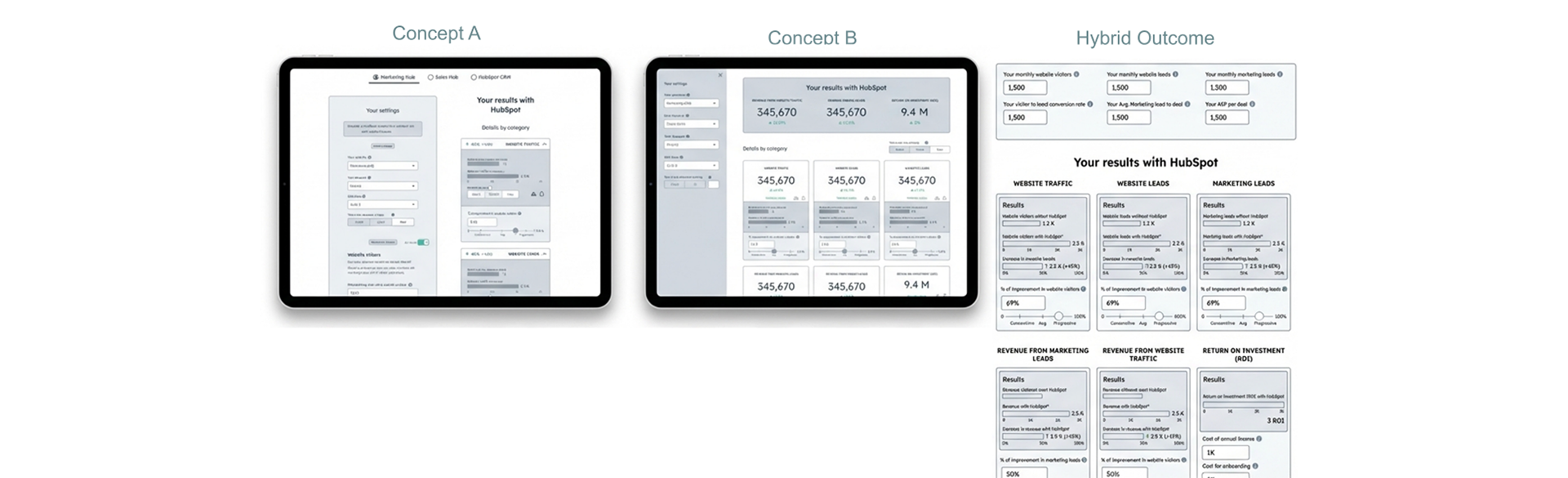
The "Hybrid" Layout (Merging Concepts)
➜ The Conflict: User testing showed a split preference: Concept A had a superior summary header, but Concept B offered better visibility of inputs.
➜ The Decision: I rejected choosing a "winner" and instead designed a Hybrid Model. I merged the strongest elements from both concepts to solve for information density by reusing the high-level summary header while keeping input fields exposed rather than hiding them in a drawer.
➜ Why: Users described this as the "sweet spot" for information density—sales reps could pitch the summary, while skeptics could audit the inputs.
Key Decision 3
Interaction Patterns Balancing Precision with Effortless Navigation
➜ The Challenge: Manual entries caused the friction when navigating the vast data ranges typical of HubSpot’s diverse customer base (e.g., comparing a small business with 1,000 visitors to an enterprise with 1,000,000+). We needed an interaction model that remained precise enough for financial planning but was far less cumbersome than typing in multiple "what-if" scenarios.
➜ The Decision: I designed a Dynamic Improvement Slider that serves as the primary engine for navigating performance ranges. Instead of forcing users to guess exact percentages, the slider toggles between three data-backed tiers: Conservative, Average, and Progressive estimates.
➜ Why: Effortless Estimation with Accurate Outcomes
◦ Quick & Effortless Interaction: The slider meets the project criteria for "ease of use" by allowing users to explore different ROI outcomes with a single drag or tap, significantly reducing the "clicks and taps" required by manual forms.
◦ Contextual Accuracy: By leveraging benchmarks from 240K+ customers, the slider allows for instant personalization. A user can lean on the Conservative side if they are switching from a mature vendor or move toward Progressive if they are adopting automation for the first time—adjusting the "confidence" of the prediction in real-time.
◦ Instant Visual Feedback: This solution successfully bridges the gap between complex backend calculations and a simple, yet functional UI. As the slider moves, it dynamically updates the detailed results cards (Traffic, Leads, Revenue), allowing users to "zoom in" on the specific metrics that resonate with their buying committee.

Key Decision 4
Data Constraints & Logic Toggle
➜ The Limitation: Despite massive data volume, drilling down to Industry + Region + Product resulted in sample sizes too small for accuracy.
➜ The Decision: A logic gate forces a single filter choice to preserve statistical integrity.

Key Decision 5
Prioritizing CTA & Lead Signals
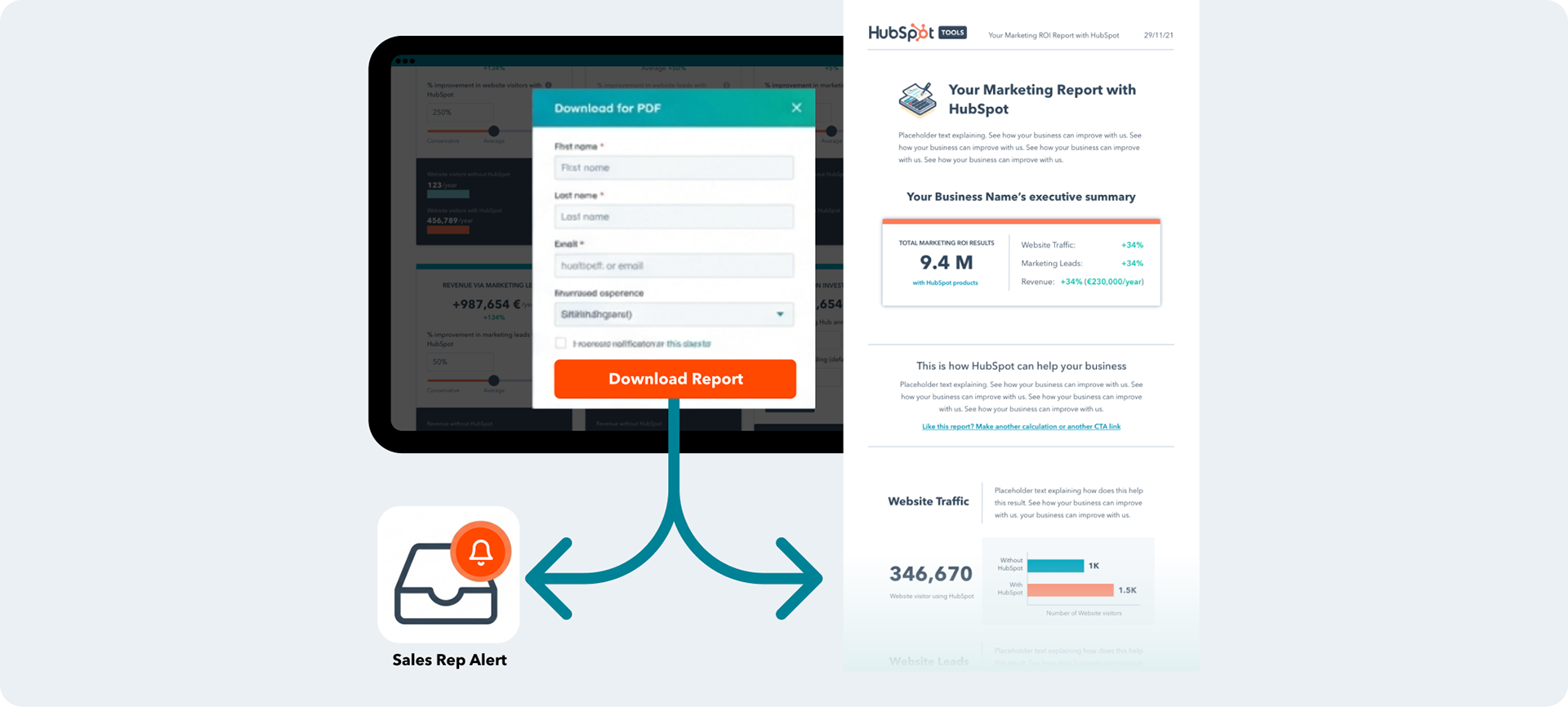
➜ Research Insight: 18/20 users needed to share results with a boss.
➜ Design Action: Elevated PDF Download to a primary, sticky СТА.
➜ The "Executive" PDF: A specific artifact designed for the "3rd Persona" (the Decision Maker), focusing on clear visualizations that could stand alone in a boardroom.
➜ Business Outcome: Download triggers 'Hot Lead' notification to Sales Rep with full prospect data.
Outcomes & Impact
➜ Solved the "Blank Page" Abandonment Friction: Zero-input logic is now standard.
➜ High Completion: "Hybrid" layout validated as the sweet spot for information density.
➜ Business Impact: The tool successfully increased new leads and sign-ups, becoming a primary driver for the "Growth" objective.
➜ User Adoption: Huge Sales Enablement improvement as reps actively adopted the tool for live demos showing value instantly using benchmarks.
➜ Team Velocity: The thorough "Discovery" and "Formula Definition" phases meant the development scope didn't change during the build, leading to high team morale and productive pair-programming sprints.
By removing the friction of input and focusing on immediate value, we turned a passive utility into an active sales engine.
The logic engine and 'Zero-Input' framework laid the groundwork for related HubSpot's Al tools moving from Static Logic to Predictive Intelligence.