Project Overview
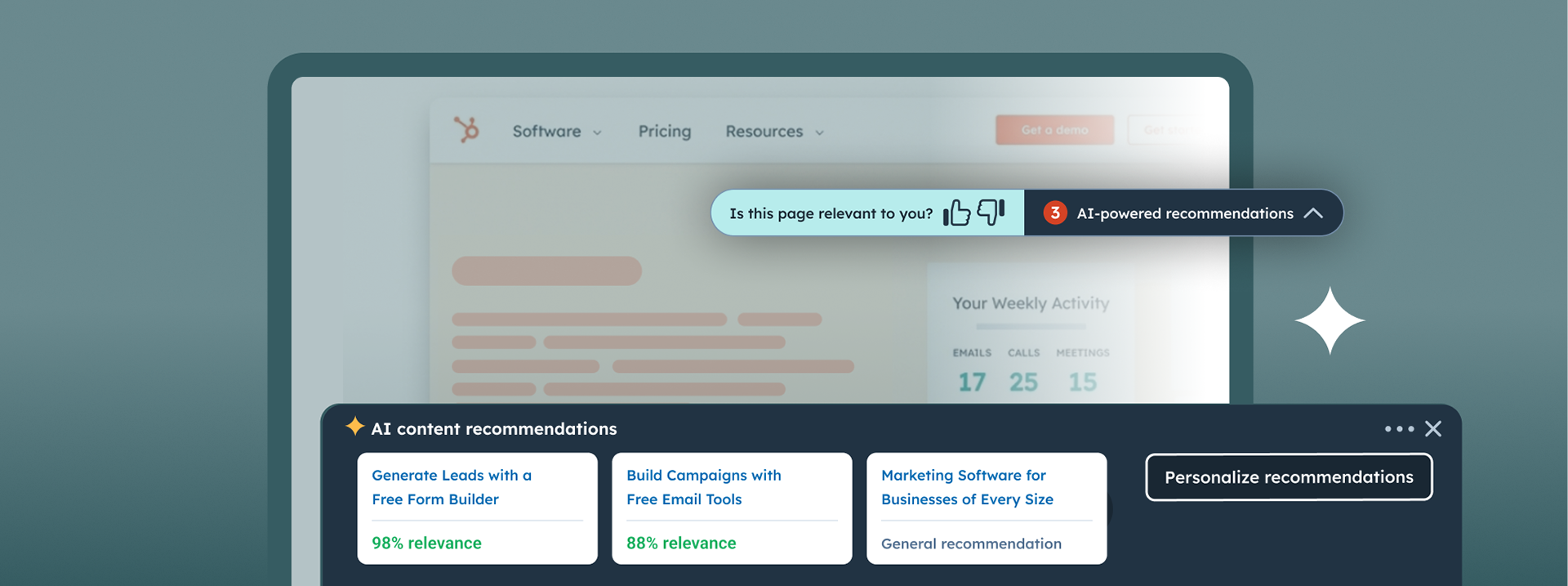
The Objective: Create an AI-powered solution that transforms static sites into dynamic experiences by surfacing instant, high-relevance, intent-based content maximizing new visitors engagement.
The Challenge: Creating a non-intrusive UX that balances AI recommendations with manual editorial control, ensuring results feel helpful rather than disruptive.
My Role: Lead UX Designer; responsible for the solution’s behavioral logic, UI integration, and the customization controls for end-users.
Process: Developed a "Context-Aware" design that allows the widget to adapt its layout and density based on the surrounding page content and user engagement patterns.
Impact: Established a scalable framework to boost session depth and user retention, seamlessly bridging raw AI data with a high-conversion browsing experience.
The Deep Dive
AI-Powered Content Recommendations Widget
Reimagining the B2B Buyer's Journey with Predictive Al
Role: Lead UX Designer
Company: Hubspot (2023 - 2024)
Scope: Product Design, UX Architecture, Design Strategy, Responsive Web, Predictive AI, Demand Generation Marketing.
Partners: Engineering, MarTech AI Solutions, Web Strategy, QA, SEO
Duration: 9 months
Company: Hubspot (2023 - 2024)
Scope: Product Design, UX Architecture, Design Strategy, Responsive Web, Predictive AI, Demand Generation Marketing.
Partners: Engineering, MarTech AI Solutions, Web Strategy, QA, SEO
Duration: 9 months

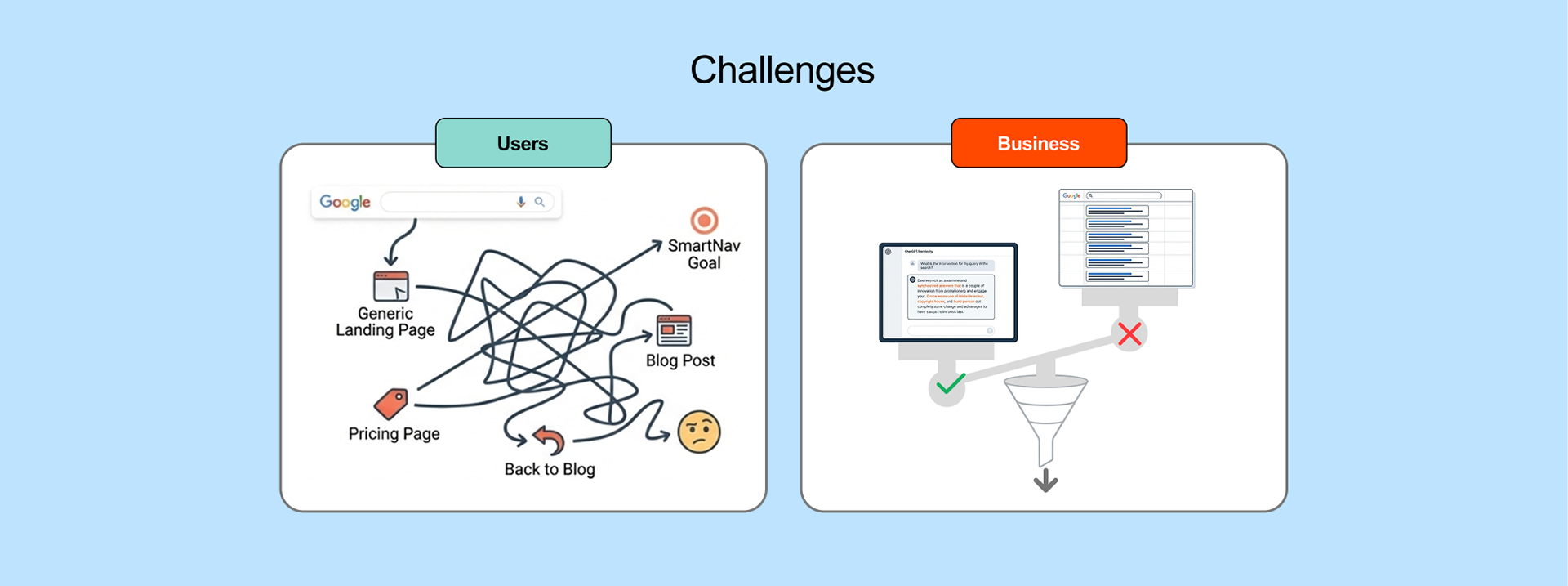
The Challenge: Entropy vs. Demand
The User Problem: Discoverability Friction.
Users suffer from "death by a million tabs." The legacy navigation forces users to zig-zag is inefficient between pricing, blogs, and product pages to find relevance.
➜ My goal: Reduce this cognitive load.
The Business Problem: Demand Generation Squeeze.
With SEO traffic declining, the business imperative was to increase conversion rates (CVR) for Demos and Signups by surfacing high-intent content earlier.
➜ My goal: Design a content personalization solution relevant to the user preferences and objective.
Role: Principal Ownership
Leading strategy, architecture, and cross-functional execution
Strategy & Scope
- Led design sprints to define the "Stranger" persona.
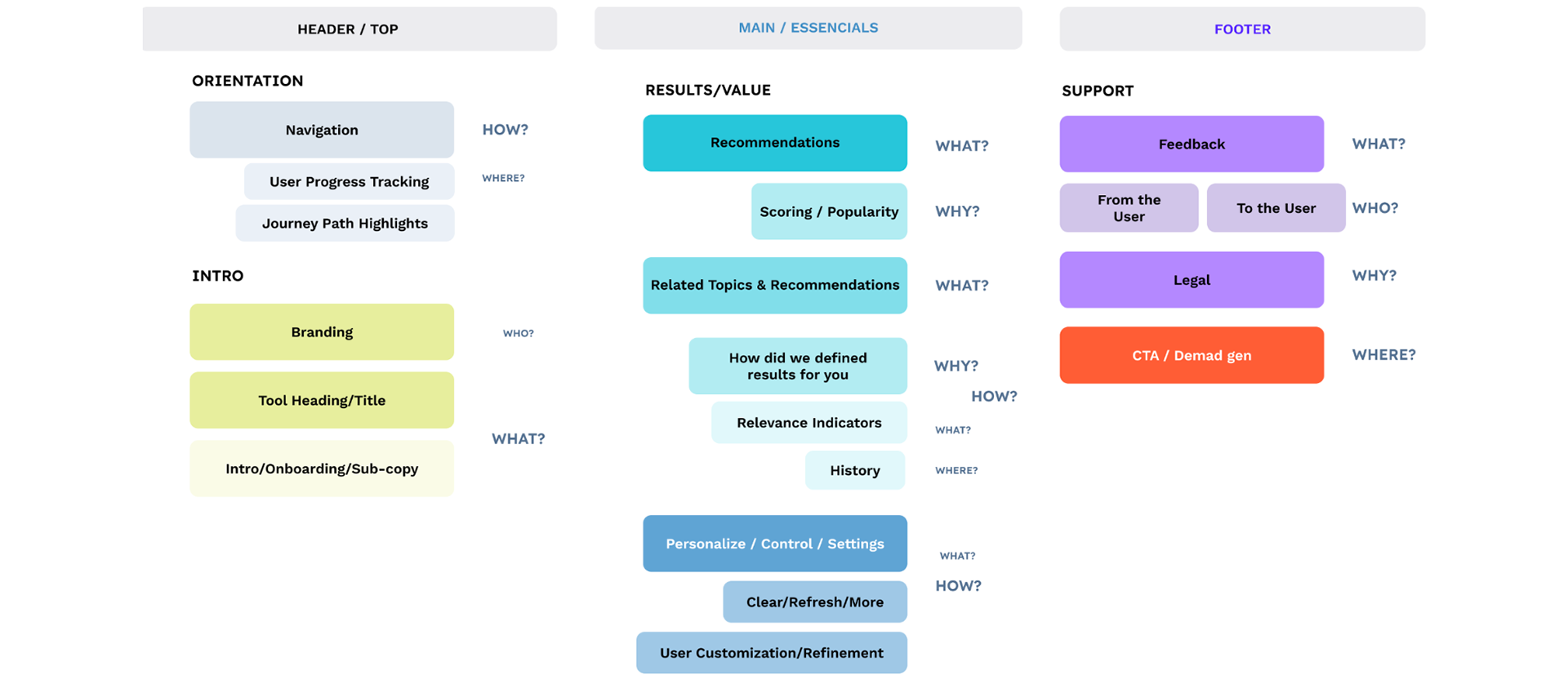
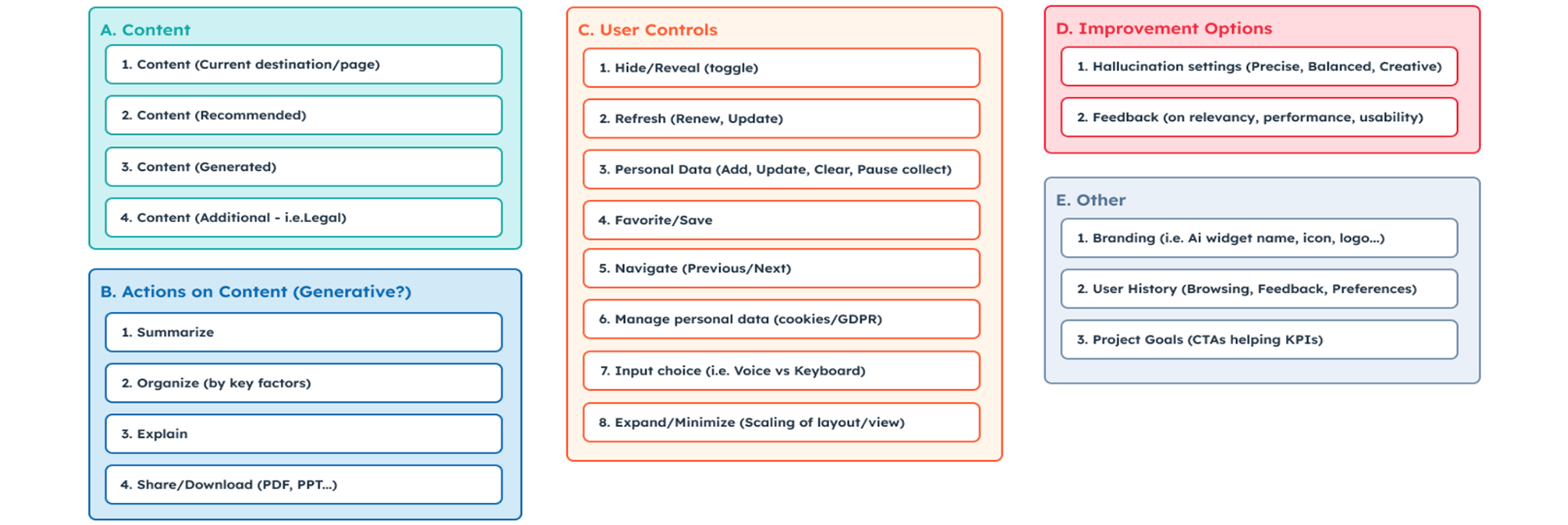
- Defined content model and MVP features.
Technical Architecture
- Designed the hybrid input model.
- Collaborated on backend logic.
Stakeholder Management
- Navigated chatbot, site nav and CTAs constraints.
- Aligned Marketing PO and Business goals.
Engineering Collaboration
- Embedded with AI MarTech internal engineers.
- Directed external Al contractors.
As the project Design Lead, I didn't just receive requirements; I helped define them.
➜ I facilitated design sprints to align Marketing, Engineering, and Web Strategy on the vision.
➜ I defined the content model and embedded directly with engineers and external AI vendors to ensure the UX matched the backend capabilities.
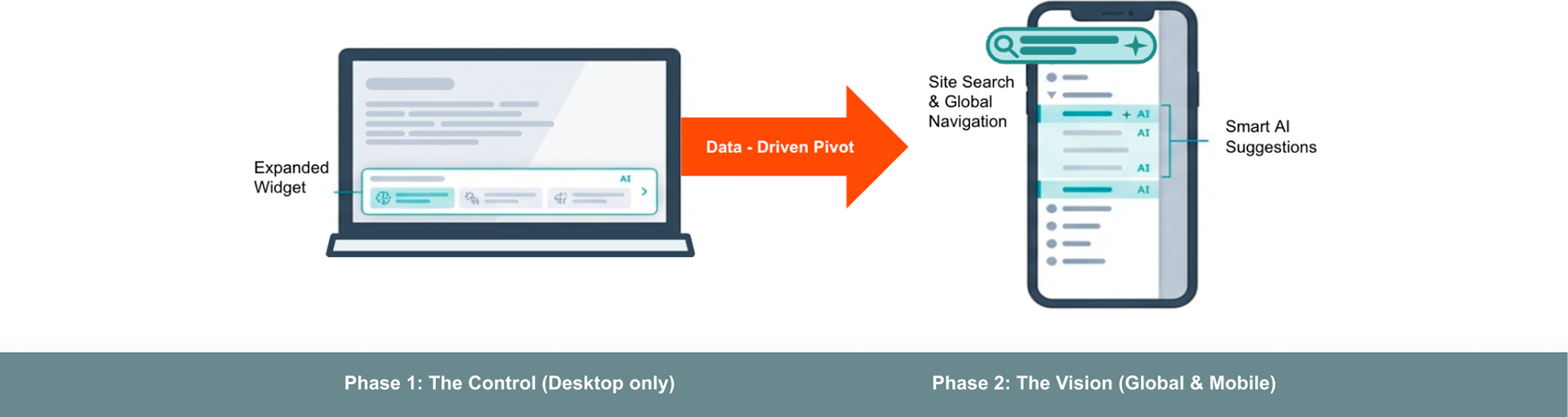
Strategic Scoping: The Mobile Constraint
Isolating variables for algorithmic training
Phase 1: The Control (Desktop Only)
Hypothesis Validation. We intentionally de-scoped mobile to minimize behavioral noise while training the recommendation algorithm. The "Expanded Widget" pattern was optimized for desktop real estate.
Phase 2: The Vision (Global & Mobile)
Architectural Integration. The floating widget is a poor mobile pattern. The long-term strategy was to retire the widget and move the intelligence into the site search, global navigation, and prioritizing mobile responsiveness.
Solving for 'The Stranger’
Personalizing the experience for anonymous users with no history
The core design challenge was the 'Cold Start': How do you personalize for a user you know nothing about?
➜ Meet the Hybrid Input Model:
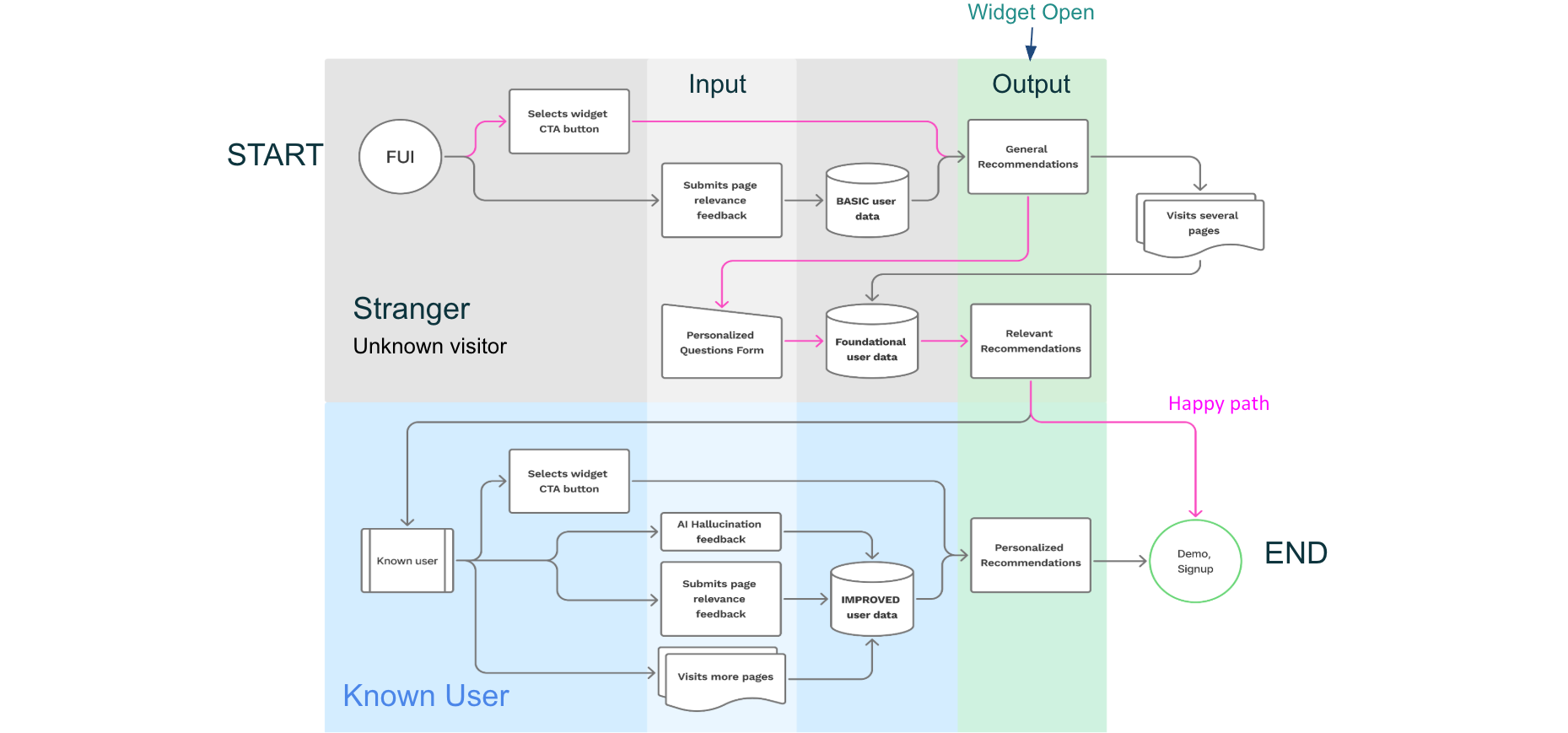
➜ Passive: The AI tracks browsing behavior (3+ pages) to generate a prediction.
➜ Active: Low-friction '3-Question Form' (Role, Goal, Company Size) allows users to manually 'seed' the model for instant value.
➜ Finally, static fallbacks were provided so the UI never looked 'broken' for new user.
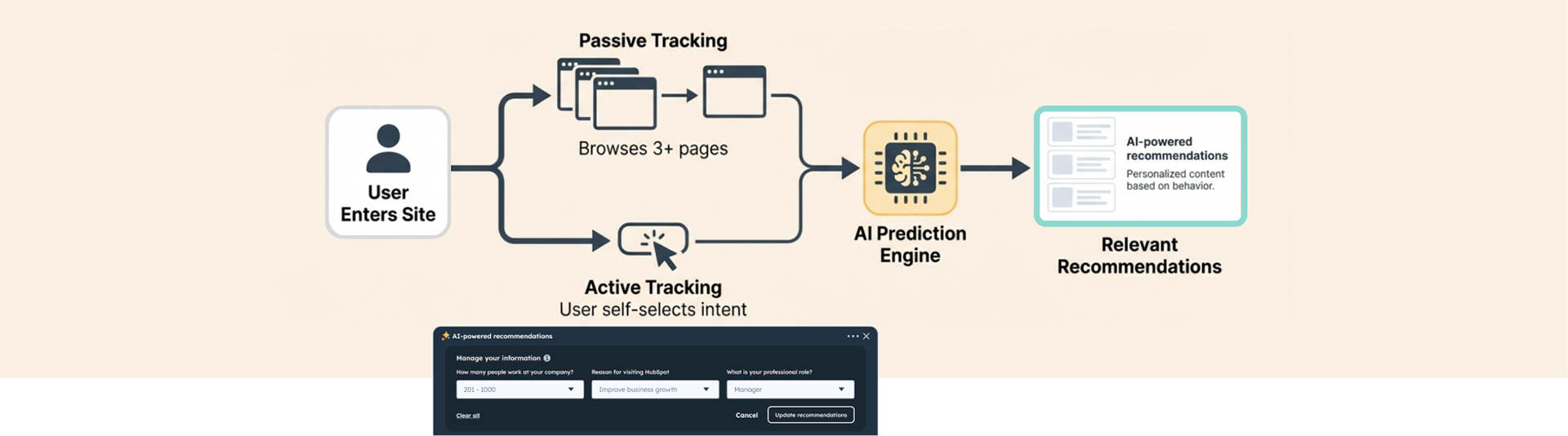
Fallback Logic: If no data exists, system defaults to static 'Best of HubSpot' content to prevent broken Ul.
Managing Constraints: The Chatbot Conflict
➜ The Constraint: Global nav and the existing chatbot could not modified or integrated.
➜ The Conflict: Competition for screen real estate and user attention.
✔ The Solution: 'Split-State' Architecture. The widget was designed to occupy a distinct visual layer: dashboard (informational) vs. chat (conversational).

Technical Fluency: The 'Black Box'
Bridging Design and Backend Logic

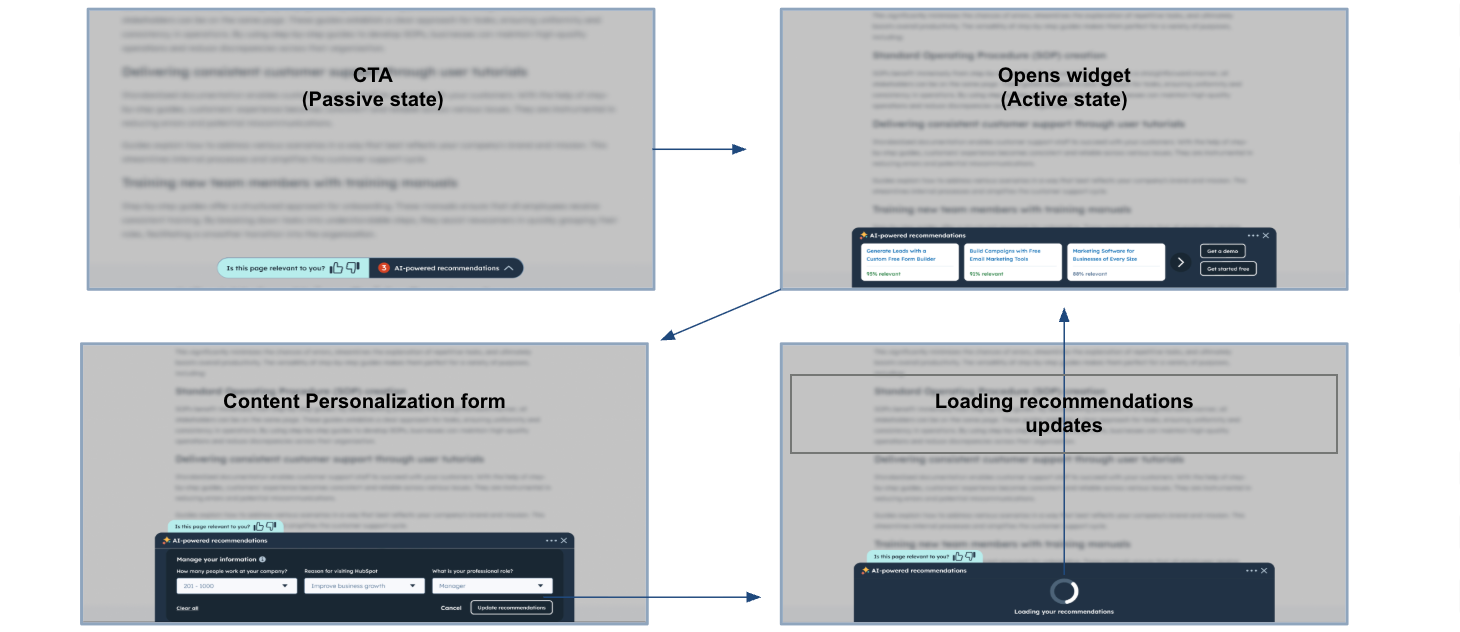
Designing for AI requires understanding the backend. I worked closely with engineers to understand the latency of the /predict API call and the logic of our vector database (Pinecone). This knowledge informed my design of the loading states: instead of a generic spinner, I designed a 'status card' that educates the user on what the AI is generating, turning latency into a trust-building moment.
The Reality Check: Inconclusive Data, Positive Signals
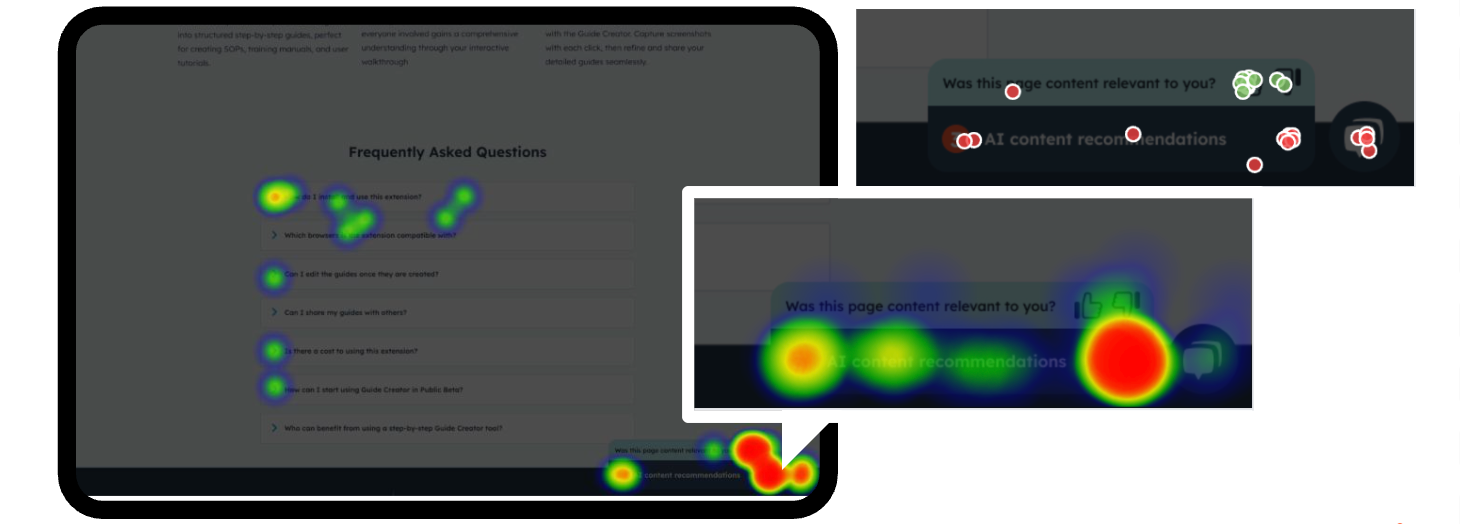
Primary signups CVR was inconclusive or flat. The widget pattern suffered from 'banner blindness. However, we saw a serious double digit increase in Meetings Booked.
The Insight: Users who did engage had very high intent. This proved the AI content was valuable, even if the interface (the widget) was limiting visibility."

User Insights: Relevance is the Motivator
I led a user research study in Q'24 to understand the gap between the flat signups and the high sales intent.
The Novelty Hook
Al attracts initial attention. Users are drawn to the 'sparkle', but utility keeps them there.
Reciprocity
Users are willing to provide data (answer the 3 questions) if the output is immediately relevant.
The Friction
The floating widget pattern suffers from 'banner blindness' on large screens and competition with the chatbot."
"I prefer this over searching manually… if the relevance score is accurate."
➜ The Qualitative Finding: Users loved the relevance of the recommendations but often missed the widget entirely.
➜ The Conclusion: We were hiding high-value content in a low-visibility container. Users told us: 'I prefer this over searching manually... if I can find it'
The Strategic Pivot
Moving from an "Add-on" Widget to a "Native" Experience
Phase 1+2: Floating Widget
- Segregated experience.
- Desktop focused.
- Competing with Chatbot.
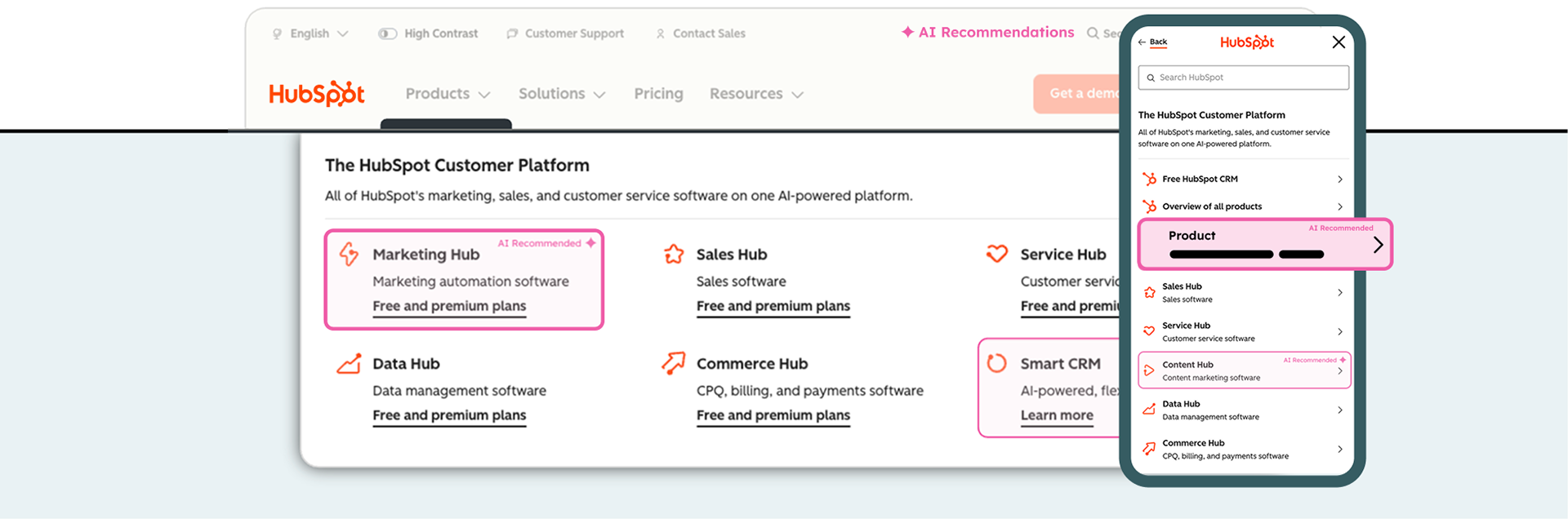
Next: Site Search and contextual navigation
- Native experience.
- Mobile responsive.
- Integrated into core mental models
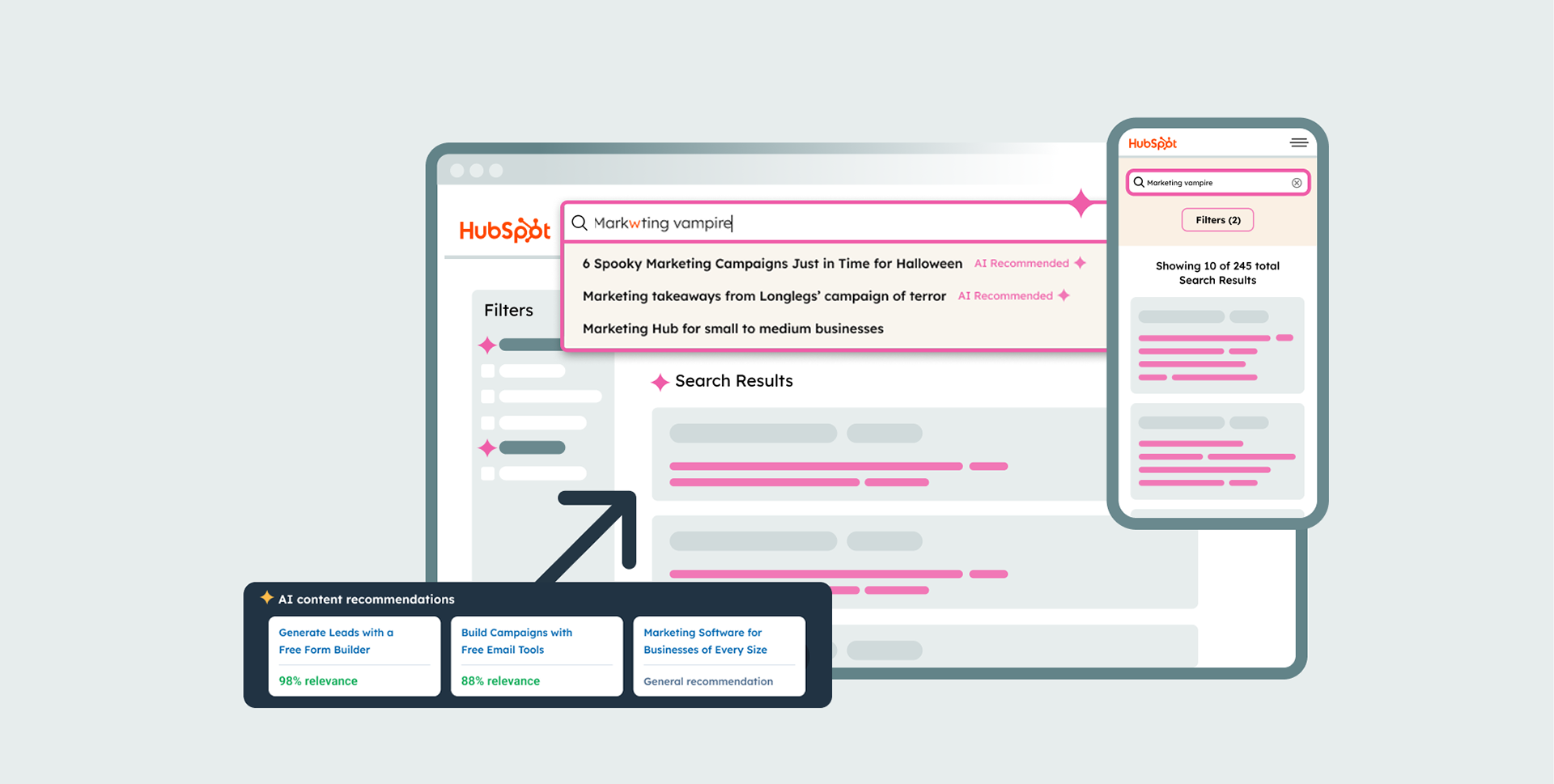
Data + Mobile Constraints + User Feedback = Architectural Pivot
I used the research to argue that iterating on the floating widget was a sunk cost.
➜ We moved from an 'Add-on' Widget to a 'Native' Integration.
➜ Instead of a sidecar tool, predictive recommendations now live where users naturally look for wayfinding.
➜ By moving the AI into the core site architecture, we solved the visibility problem and the mobile constraint simultaneously, as the core navigation is natively responsive. This aligns with the user's mental model and scales seamlessly across mobile and desktop devices
Redefining the Principal Role: Beyond the UI
✔ Validated Novel Technology
Proved the viability of Al recommendations on the core marketing site.
✔ Protected Revenue Streams
Navigated legacy constraints to ensure nav, chatbot and CTAs (high revenue) remained unimpacted.
✔ Strategic Architecture
Used inconclusive MVP data to pivot from a temporary widget to a permanent site search and global navigation integration.
Artifacts
Prototype
Product Vision Map
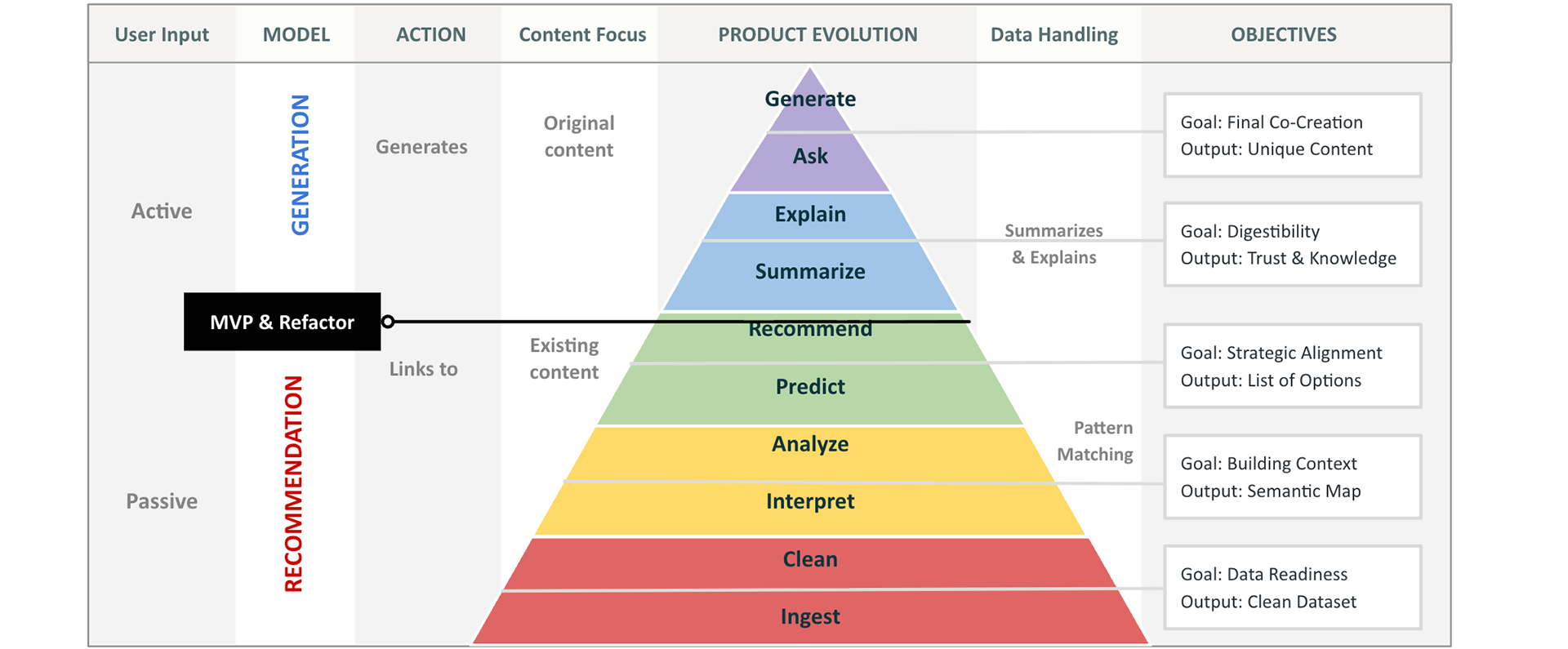
Content Model: Structure
Content Model: Function
Flow
States
Heatmaps Tracking